HonkMobile: Pay for Parking
- 4.4
- Rating
- 1.00M
- Installs
- Free
- Price

 Analysis by App-foxy
Parking apps often promise to remove the most irritating part of driving into a busy area: finding a space is difficult enough, but paying for it can become a separate chore. After spending time with HonkMobile: Pay for Parking, I found its central idea easy to appreciate. It brings parking search and payment into one Maps & Navigation app, so I can deal with a parking session from my phone instead of looking for a meter, carrying coins, or standing beside a machine while traffic moves around me.
That convenience is the reason to try it, but it is not a universal replacement for every parking method. The experience depends heavily on whether the location I want to use is covered and whether I am comfortable checking the parking details before I leave the car. My overall view is positive: HonkMobile is most useful for people who regularly park in supported areas and want a quicker way to start, monitor, and finish a session. It is less compelling for occasional drivers who already have a reliable meter routine or who park mostly in places where app-based payment is not available.
What using HonkMobile feels like in everyday parking
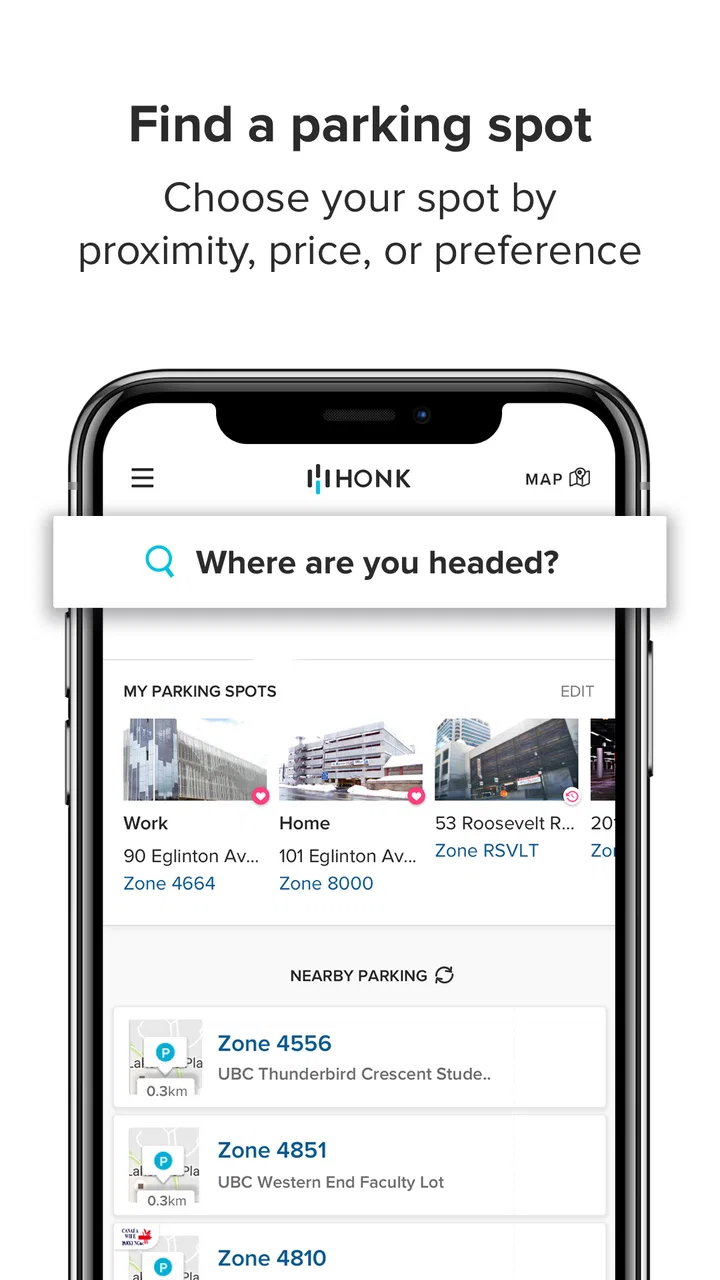
The app is developed by HonkMobile and sits in the Maps & Navigation category. Its basic workflow is straightforward: I use it to search for parking, identify a suitable location, and pay through the app. That combination matters because parking decisions are usually made under pressure. I may be approaching a destination, watching traffic, and trying to remember an address at the same time. Having the search and payment process together is more practical than switching between a general map, a separate parking website, and a physical meter.
You May Also Like

 Blood Strike: 2.5 Anniversary
Blood Strike’s Loadouts Turn Every Drop Into a Tactical Gamble
A close look at Blood Strike’s custom loadouts: how fast access to signature weapons reshapes its battle royale rhythm, rewards preparation, and narrows the gap between fights.

 Pandora - Music & Podcasts
Pandora’s Music Is Easy to Start, but Harder to Recover
Pandora’s strength is its low-effort path from a seed to a station. Its weak spot is how much confidence it asks you to place in connection, setup, and quiet recovery.

 8 Ball Pool
 Is Built on Rivalries, Rematches, and Routine
A close look at the rivalries, rematches, shared routines, and unanswered safety questions that turn a quick pool match into a persistent mobile community.

 Samsung Music
’s Quiet Strength Is Playing What You Already Own
Its reach comes less from spectacle than from dependable access to a personal library. That simplicity is both the app’s strongest retention engine and its ceiling.

 AccuWeather: Weather Radar
AccuWeather Review: A Quick, Clear Forecast for Everyday Decisions
For everyday plans, the best forecast is the one you can understand quickly. AccuWeather makes rain timing, radar, and local conditions easy to act on, with a few trade-offs.

 Hill Climb Racing
Why Hill Climb Racing Still Turns Crashes Into One More Run
A tiny car, a bumpy hill and one more upgrade: Hill Climb Racing keeps resurfacing because its simple chaos makes every near-miss feel personal.
More From Our News Desk



A realistic example is a short appointment in an unfamiliar downtown area. Before driving all the way to the destination, I can use the app to look for a parking option rather than simply hoping to spot a vacant space. Once parked, the phone-based payment process can save the awkward moment of searching for change or trying to read a meter in poor weather. When the appointment takes longer than expected, the ability to manage parking digitally is more comfortable than returning to a machine and starting over.
I also like the way this changes the mental load of parking. A traditional meter makes the payment point the center of the experience: I find the car, find the meter, work out the instructions, and then estimate how long I will be away. HonkMobile shifts attention toward the parking location itself. That does not make the space more available, but it can make the administrative part less distracting. For someone who parks several times a week, that small improvement can become genuinely useful.
The app is free to install, which removes the biggest barrier to testing it. It is rated for Everyone, so its presentation is not aimed at a narrow specialist audience. Its current version is 6.17.0, and the listed minimum operating system is Android 5.1. That broad device support is helpful for people who keep an older phone as a daily driver, although the quality of the experience will still depend on the phone, connection, location services, and the parking area being supported.
The strongest advantage is reducing friction at the curb
The best part of HonkMobile is not the idea of paying by phone on its own. Many parking services do that. The stronger point is the combination of discovery and payment. I can begin with the practical question, “Where can I park near this destination?” and continue toward payment without treating those as two unrelated tasks. That makes the app feel more like a parking tool than merely a digital meter.
There is also a useful difference between planning and reacting. If I am visiting an unfamiliar neighborhood, searching before I arrive can help me think about parking as part of the trip rather than as an emergency after I reach the destination. This is especially valuable when I have a deadline, passengers waiting, or luggage in the car. I would still check the signs at the actual space, but the app gives me a better starting point than driving around without a plan.
Another practical strength is that digital payment can be easier when physical meters are inconvenient. A meter may be positioned away from the car, exposed to rain, difficult to read in bright sunlight, or surrounded by other people waiting to use it. With HonkMobile, the phone becomes the payment interface. That is not just a modern-looking alternative; it can be a meaningful accessibility and comfort improvement for someone who finds curbside machines awkward.
My most useful habit with the app is to open it before I am directly beside the destination. I search while stopped safely or before starting the drive, compare the available parking choices, and only then commit to a route. This avoids making a last-second decision while moving through traffic. It also gives me time to notice whether the selected location is actually convenient for the building I am visiting, rather than choosing the first result that appears.
A second tip is to treat the app as one part of parking verification, not as permission to ignore signs. Digital payment does not change restrictions, loading rules, street-cleaning schedules, reserved spaces, or the permitted duration shown at the location. I still read the sign and confirm that the space matches the session I am about to start. This is an important trade-off: the app can simplify payment, but it cannot replace the driver’s responsibility to understand the physical parking rules.
Where it compares well with meters and general map apps
Compared with a regular parking meter, HonkMobile is more convenient when I want to avoid coins, reduce time at the curb, or handle parking from a phone. A meter can still be better when I do not want to create an account, when my phone battery is low, or when the location has a machine that is faster than opening an app. The old method also has one advantage that should not be dismissed: it is immediately visible at the space and does not depend on mobile connectivity or a functioning phone.
Compared with a general map app, HonkMobile is more focused. A map may be excellent for directions and broad location awareness, but it is not necessarily designed around the full parking transaction. HonkMobile’s value is greatest when the task is not simply finding a destination, but finding a usable parking option and paying for it. I would use a general map for the overall journey and this app for the parking-specific part when the area supports it.
That distinction also explains why I would not install it expecting a complete answer to every parking problem. The app can help me search and pay, but it cannot guarantee that a particular space will still be open when I arrive. Nor does a digital interface eliminate the need to compare walking distance, restrictions, and the likely length of my visit. The app improves the transaction; it does not turn parking into a predictable resource.
The meaningful weakness: coverage and context still matter
The biggest limitation is the one shared by most location-based parking tools: usefulness changes from place to place. If I am in an area that does not offer a suitable HonkMobile option, the app cannot help simply because I have installed it. I may still need a meter, a garage’s own payment process, or another local service. This makes it difficult to rely on HonkMobile as my only parking method, particularly when I travel between cities or visit smaller locations.
There is also a small but important risk of false confidence. Seeing a parking option in an app can feel more certain than it really is. I still need to confirm the exact location, the signs, and the terms shown at the space. A nearby result may not be the best choice if it requires a long walk, sits on the wrong side of a busy road, or applies to a different section of the street. The app helps narrow the decision, but I remain responsible for matching the digital choice to the physical spot.
Phone dependence is another drawback. If the battery is nearly empty, the signal is unreliable, or I am dealing with a crowded area where the app loads slowly, the convenience can disappear at exactly the wrong moment. I would not begin a long day of driving with HonkMobile as my only backup. Keeping another payment option available is sensible, especially for unfamiliar areas or trips where arriving on time matters.
The payment process can also feel like extra preparation for drivers who rarely need it. Someone who parks once every few months may prefer a simple meter and may not see enough benefit in maintaining another app. In that case, HonkMobile is not a must-have. Its value grows with repetition: the more often I face paid parking, the more useful it becomes to have a consistent phone-based workflow.
Small habits that make the app more dependable
I recommend checking the destination and parking choice before pulling into the area. This is the safest way to use a search-based parking app because it separates planning from driving. If I wait until I am blocking traffic or circling a crowded street, even a simple interface becomes stressful. Preparing the parking decision early also makes it easier to compare a closer space with one that may be easier to enter or leave.
I would also inspect the final details at the vehicle rather than assuming that the first search result is correct. Look at the street sign, confirm the zone or location information displayed in the app, and make sure the car is actually parked within the permitted area. This extra check takes little time and protects against the most frustrating kind of mistake: paying successfully for the wrong place.
For longer visits, I would build a reminder into my routine. The app may make payment easier, but I should still remember the end of the parking session and any time limit. An app cannot judge whether my meeting has run over or whether I have moved the car. I find the best approach is to connect the parking session with the appointment or calendar reminder already associated with the trip.
One less obvious trade-off is that convenience can encourage overreliance. Because the payment feels simple, I may be tempted to choose a parking location without considering the return journey. At night, in bad weather, or with children, the nearest available option is not automatically the best one. I use the app to find possibilities, then make the final choice based on walking route, visibility, and how easily I can leave the area later.
Who should use it, and who should skip it?
HonkMobile is a good fit for urban drivers, commuters, visitors attending appointments, and anyone who regularly pays for parking in supported locations. It is particularly useful if you dislike handling coins, often arrive at unfamiliar destinations, or want to reduce the time spent at curbside machines. The app’s free price makes it reasonable to keep installed even if I use it only when travelling to areas where it is useful.
It also suits people who prefer to organize a trip from one phone. Search, parking choice, and payment belong to the same practical task, and HonkMobile keeps that task focused. A driver who already uses a separate navigation app can still see the value here: the general map handles the journey, while HonkMobile handles the parking decision and transaction.
I would be more cautious about recommending it to someone who mostly parks in private garages with their own systems, uses free residential parking, or rarely visits covered areas. It is also not the right primary solution for a driver who does not want to depend on a smartphone. In those situations, a physical meter, a garage’s established payment method, or a general navigation tool may be simpler.
The app has built a substantial audience, with more than a million installs and an average rating of 4.4 from roughly 7,300 ratings. Those figures suggest that the basic problem it addresses is familiar and that many users find the approach worthwhile. I would still interpret that popularity carefully: a parking app can be well received overall while remaining less useful in a particular neighborhood, because local coverage is central to the experience.
My final verdict after using it
HonkMobile succeeds because it focuses on a real moment of everyday frustration rather than trying to be a complete travel platform. When I can use it in the area where I am parking, it makes the process more orderly: I search for an option, check the physical signs, and pay from the phone. That is a meaningful improvement over circling blindly or standing at a meter in bad weather.
Its limitations are equally clear. It cannot reserve certainty where parking supply is unpredictable, it cannot replace careful reading of local restrictions, and it is not a dependable universal method when coverage or phone access is an issue. I would keep a backup payment option and avoid opening it while driving. Those are not reasons to reject the app; they are the sensible boundaries around its convenience.
My recommendation is specific: install it if paid parking is a regular part of your life or if you often drive into unfamiliar areas. Use it as a focused parking companion, not as a substitute for common sense at the curb. For that audience, the free app from HonkMobile earns a place on the phone because it removes enough small obstacles to make parking less irritating. For everyone else, it is worth trying once in a supported area, but it may remain an occasional tool rather than an essential app.
In short, HonkMobile is at its best when you plan the parking step before arrival and verify the physical space before paying. That simple workflow captures both its strongest benefit and its main limitation: the app can make the transaction smoother, but the driver still has to make the right parking decision.
FAQs for HonkMobile: Pay for Parking
01How does HonkMobile work?
HonkMobile is a convenient app that allows you to pay for parking using your smartphone. Once you've installed the app, simply enter your parking location code, select the duration, and pay through the app. It saves you from the hassle of using meters or trying to find change for parking.
02Is HonkMobile available in my city?
HonkMobile supports numerous locations across North America. To check availability, you can visit their website or explore the app, which provides a map of supported areas. This ensures you're covered whether you're at a familiar spot or traveling to a new city.
03What payment methods does HonkMobile accept?
HonkMobile accepts several payment methods, including major credit cards, debit cards, and digital wallets like Apple Pay and Google Pay. This variety allows you to choose the most convenient option for you, enhancing the flexibility and ease of use when paying for parking.
04Are there any additional fees when using HonkMobile?
While the app itself is free to download, there may be small convenience fees added to each parking transaction. These fees are generally nominal and are used to maintain the app's services. It's advisable to review the transaction summary before finalizing your payment.
05How secure is my personal information with HonkMobile?
HonkMobile prioritizes user security by employing industry-standard encryption and security measures. Your personal and payment information is stored securely, ensuring it is protected from unauthorized access. Regular updates and security patches are applied to maintain a high level of protection.
Pros
- User-friendly interface for easy navigation.
- Wide availability in various cities.
- Secure payment options.
- Real-time parking availability updates.
- Saves time with quick transactions.
Cons
- Limited support in smaller towns.
- Occasional app crashes affect usability.
- Needs constant internet connection.
- Some features locked behind paywall.
- GPS accuracy issues in dense areas.

HonkMobile: Pay for Parking
Gallery